Graphic Programming
Here are some graphics techniques where I have developed in my custom Game engine
Tools : C++,GLSL, OpenGL, NVIDIA PhysX
Graphic Programming
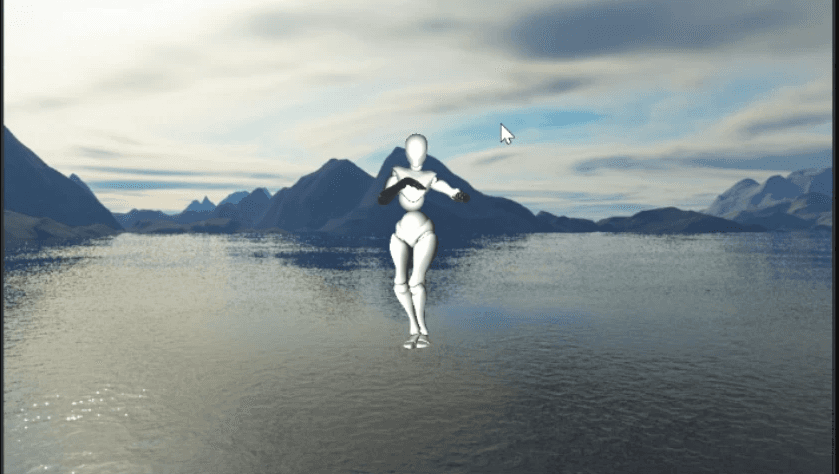
Skeletal Animation
Techincal View
First, I loaded the model using Assimp and stored the animation data, which includes animation clips, bone Node with transformations, and keyframes with time from Assimp. I created a struct called BoneNode that stores the data of bone name, index (aka bone ID), transformation matrix, and child nodes. While loading the model, I would generate Bone hierarchy and set each mesh's vertex with the respective bone ID and the weight by which the vertex is influenced by that bone.
Next, I updated the bone transformations by interpolating keyframes of position, rotation, and scale with respect to time. I then took the updated bone transformations and stored them in the respective BoneNode, updating the values in the shader. For more information, please refer to LearnOpenGL
LOD's Level Of Detail
The Level of detail or LOD is something adjusting the complexity of 3D models based on their distance from the camera or their importance in the scene.
Techincal View
Basically, I check the game view camera's distance from the models that use LOD.
I determine the LOD models using a struct I created called
LODElement, which contains the mesh index and the distance from the camera to draw.
Render Texures and Post processing
Off-screen rendering allows me to render scenes or images to a buffer that isn't displayed directly on the screen. Instead of rendering directly to the screen, I render to a texture or a frame buffer.
Techincal View
I created a Render Texture class similar to my other texture classes, but it includes a frame buffer. In my rendering loop, I render the camera based on the frame buffers. Even the scene view and game view editors are rendered using frame buffers. This approach has taught me how other game engines implement multiple viewports and has also introduced me to post-processing effects.
For post-processing effects, I take the scene render texture and add another frame buffer, binding it with shader effects such as chromatic aberration and pixelization, which I learned from ShaderToy. I apply these effects to a quad, and the resulting quad is drawn on the screen. This process creates chromatic visuals on the render texture. You can see the attached YouTube video for a better understanding.
Instancing
In my engine, I implemented mesh instancing to efficiently render multiple instances of a model with various transformations. This technique reduces the overhead of drawing each instance individually, significantly improving performance.Utilized mesh instancing to efficiently render over 50 tree models in a scene.
Techincal View
Utilized mesh instancing to efficiently render over 50 tree models in a scene
Implementation Details :
Vertex Shader: Modified the vertex shader to handle instance-specific data.Adjusted the vertices' positions for each instance based on unique properties such as position, rotation, and scale.Instance Buffer: Created an instance buffer containing transformation matrices for each of the 50+ tree models.Sent the instance buffer to the GPU to provide necessary data for rendering each instance.Drawing: Issued a single draw call to render all tree instances. Drastically reduced the number of draw calls, improving rendering efficiency and maintaining high performance.
Occlusion Culling
I implemented frustum culling in my engine to optimize 3D rendering performance. By only rendering objects within the camera's view frustum, I reduced the number of polygons the GPU needs to process.
Techincal View
Used the camera's view matrix to define frustum planes.Created a Bounding Volume Hierarchy (BVH) for efficient model management.Set models outside the frustum to an invisible state to improve performance.
Skeletal Animation
Technical Aspect
Basically, I check the game view camera's distance from the models that use LOD. I determine the LOD models using a struct I created called LODElement, which contains the mesh index and the distance from the camera to draw.
Skeletal Animation
Technical Aspect
First, I loaded the model using Assimp and stored the animation data, which includes animation clips, bone Node with transformations, and keyframes with time from Assimp. I created a struct called
BoneNodethat stores the data of bone name, index (aka bone ID), transformation matrix, and child nodes. While loading the model, I would generate Bone hierarchy and set each mesh's vertex with the respective bone ID and the weight by which the vertex is influenced by that bone.Next, I updated the bone transformations by interpolating keyframes of position, rotation, and scale with respect to time. I then took the updated bone transformations and stored them in the respective
BoneNode, updating the values in the shader. For more information, please refer to LearnOpenGL
Render Texures and Post processing
Off-screen rendering allows me to render scenes or images to a buffer that isn't displayed directly on the screen. Instead of rendering directly to the screen, I render to a texture or a frame buffer.
Technical Aspect
I created a Render Texture class similar to my other texture classes, but it includes a frame buffer. In my rendering loop, I render the camera based on the frame buffers. Even the scene view and game view editors are rendered using frame buffers. This approach has taught me how other game engines implement multiple viewports and has also introduced me to post-processing effects.For post-processing effects, I take the scene render texture and add another frame buffer, binding it with shader effects such as chromatic aberration and pixelization, which I learned from ShaderToy. I apply these effects to a quad, and the resulting quad is drawn on the screen. This process creates chromatic visuals on the render texture. You can see the attached YouTube video for a better understanding.
LOD's Level Of Detail
The Level of detail or LOD is something adjusting the complexity of 3D models based on their distance from the camera or their importance in the scene.
Technical Aspect
Basically, I check the game view camera's distance from the models that use LOD. I determine the LOD models using a struct I created called LODElement, which contains the mesh index and the distance from the camera to draw.
Render Texures and Post processing
Off-screen rendering allows me to render scenes or images to a buffer that isn't displayed directly on the screen. Instead of rendering directly to the screen, I render to a texture or a frame buffer.
Technical Aspect
I created a Render Texture class similar to my other texture classes, but it includes a frame buffer. In my rendering loop, I render the camera based on the frame buffers. Even the scene view and game view editors are rendered using frame buffers. This approach has taught me how other game engines implement multiple viewports and has also introduced me to post-processing effects.For post-processing effects, I take the scene render texture and add another frame buffer, binding it with shader effects such as chromatic aberration and pixelization, which I learned from ShaderToy. I apply these effects to a quad, and the resulting quad is drawn on the screen. This process creates chromatic visuals on the render texture. You can see the attached YouTube video for a better understanding.
LOD's Level Of Detail
The Level of detail or LOD is something adjusting the complexity of 3D models based on their distance from the camera or their importance in the scene.
Technical Aspect
Basically, I check the game view camera's distance from the models that use LOD.
I determine the LOD models using a struct I created called
LODElement, which contains the mesh index and the distance from the camera to draw.
Instancing
In my engine, I implemented mesh instancing to efficiently render multiple instances of a model with various transformations. This technique reduces the overhead of drawing each instance individually, significantly improving performance.
Project Overview
Utilized mesh instancing to efficiently render over 50 tree models in a scene.
IMPLEMENTATION DETAILS
Vertex Shader
Modified the vertex shader to handle instance-specific data.
Adjusted vertices' positions for each instance based on unique properties such as position, rotation, and scale.
Instance Buffer
Created an instance buffer containing transformation matrices for each of the 50+ tree models.
Sent the instance buffer to the GPU to provide necessary data for rendering each instance.
Drawing
Issued a single draw call to render all tree instances.
Drastically reduced the number of draw calls, improving rendering efficiency and maintaining high performance.
Instancing
In my engine, I implemented mesh instancing to efficiently render multiple instances of a model with various transformations. This technique reduces the overhead of drawing each instance individually, significantly improving performance.
Technical Aspect
Utilized mesh instancing to efficiently render over 50 tree models in a scene.Implementation Details :Vertex Shader:Modified the vertex shader to handle instance-specific data.Adjusted vertices' positions for each instance based on unique properties such as position, rotation, and scale.Instance Buffer:Created an instance buffer containing transformation matrices for each of the 50+ tree models.Sent the instance buffer to the GPU to provide necessary data for rendering each instance.Drawing:Issued a single draw call to render all tree instances.Drastically reduced the number of draw calls, improving rendering efficiency and maintaining high performance.
Occlusion Culling
I implemented frustum culling in my engine to optimize 3D rendering performance. By only rendering objects within the camera's view frustum, I reduced the number of polygons the GPU needs to process.
Technical Aspect
Used the camera's view matrix to define frustum planes.Created a Bounding Volume Hierarchy (BVH) for efficient model management.Set models outside the frustum to an invisible state to improve performance.
Graphic Programming
Here are some graphics techniques where I have developed in my custom Game engine
Tools Used
C++,GLSL, OpenGL, NVIDIA PhysX
Project scale
Team - Ibrahim I Uphendra
Year
2024
Let’s Work
together, and level
up creativity!
Physics Programming
Physics Programming